
Cron syntax for self-hosters: schedules you can still read six months later
A practical tutorial on the small part of cron syntax that matters for backups, cleanup jobs, health checks, and routine server maintenance.

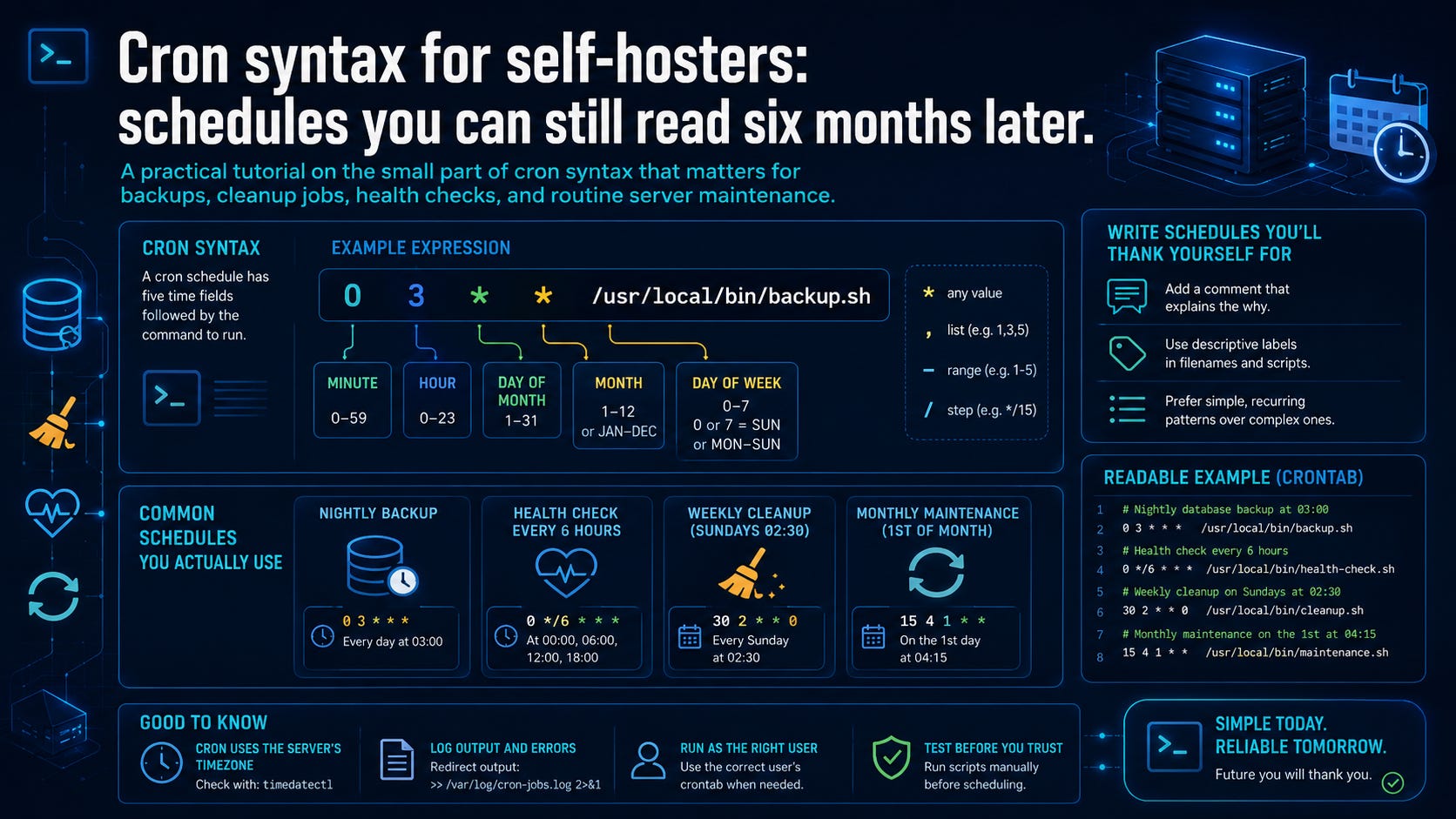
A cron expression often looks obvious when you copy it and suspicious six months later, after the job has quietly become infrastructure.
The syntax is small, but the consequences are not. A single crontab line can become part of your backup process, your cleanup routine, your monitoring, or the only thing that notices a service has gone stale. It starts as a convenience. Over time, it becomes part of how the machine stays usable.
For self-hosters, scheduled work is usually the plumbing you stop thinking about. Backups run at night. Cleanup jobs trim old files. Health checks generate reports. Certificate renewal hooks fire when they need to. Once a job survives for a while, it stops feeling like a command and starts feeling like part of the host. That is why the schedule needs to remain readable.
This article focuses on the readable subset: the cron syntax most self-hosters actually use, plus the operating habits that keep scheduled jobs from becoming small, silent liabilities. If you can read a cron expression as a sentence about time, most of cron becomes manageable.
The problem: cron jobs become invisible infrastructure
A lot of self-hosting work begins with one-off commands. You test a backup script manually. You prune caches. You hit an endpoint to generate a status report. Then, once the command works, you put it in cron and move on.
That is reasonable, but it changes the operating context. The command now runs unattended. It may run while you are asleep, while a container is restarting, while a disk is close to full, or while a mount or environment variable you rely on is missing.
Copied cron expressions cause trouble because the line often outlives the memory of why it was written. Someone remembers that the job should run “every so often,” but not whether */6 means every six hours in the intended way, or how the day-of-month and day-of-week fields interact.
At that point, troubleshooting becomes more than script debugging. You are also debugging timing, environment, logging, overlap, and hidden assumptions. The schedule may be syntactically valid and still not clear enough to trust.
A practical standard is simple: write cron as if future-you will inherit the host with no context except the files on disk.
Cron syntax as a sentence
At the center of cron is a small idea. A cron line is made of five time fields followed by a command. In the common format used by standard user crontabs, the fields are:
minute hour day-of-month month day-of-week commandThat five-field structure is documented in the crontab manual and is also the basic shape used by cron-like schedulers such as GitHub Actions schedules, though hosted platforms may add their own limits, time zone rules, and delays.
Here is a simple example:
15 3 * * * /usr/local/bin/backup.shRead it as:
At minute 15 of hour 3, on every day of the month, in every month, on every day of the week, run
/usr/local/bin/backup.sh.
That wording is clunky on purpose. It forces you to read each field as a constraint on time:
A practical field diagram helps:
┌──────────── minute: 0-59
│ ┌────────── hour: 0-23
│ │ ┌──────── day of month: 1-31
│ │ │ ┌────── month: 1-12
│ │ │ │ ┌──── day of week: 0-7
│ │ │ │ │
15 3 * * * /usr/local/bin/backup.sh
Read cron from left to right as a time sentence, then look at the command. That habit prevents a lot of cargo-cult editing.
Before saving a schedule, translate it into plain English. If you cannot explain it without squinting, simplify it or add a comment. A crontab is a bad place to hide cleverness.
The four useful operators
Most self-hosting tasks only need four operators:
*     any value
,     list of values
-     range
/     step
Some cron implementations support extra syntax, names, macros, or nonstandard extensions. Those can be useful, but they are not the core model. For routine maintenance, these four operators carry almost everything.
Wildcard: *
The wildcard means “any valid value in this field.”
0 3 * * *This means: minute 0, hour 3, any day of month, any month, any day of week. In plain English: every day at 03:00.
The wildcard only means “this field is unrestricted.” If all five fields are wildcards, like this:
* * * * *the job matches every minute. That may be appropriate for a cheap local heartbeat, but it is also how expensive jobs accidentally run 1,440 times per day.
List: ,
A comma separates explicit values in a field.
0 3,15 * * *This means: at 03:00 and 15:00 every day.
Lists are good when the intended times are specific and few. 8,20 is readable. 1,7,13,19 is still understandable. Once a list becomes long or hard to explain, the schedule probably needs rethinking.
For self-hosters, lists work well for reports and checks that should happen at human-meaningful times: morning and evening, before and after a maintenance window, or shortly after a backup should have completed.
Range: -
A hyphen gives a continuous range.
0 3-5 * * *This means: at 03:00, 04:00, and 05:00 every day.
Ranges are useful when you genuinely mean a block of adjacent values. If you want polling during business hours or maintenance work during a quiet window, a range can be clearer than a long list.
Use ranges only when the block itself is meaningful. 3-5 says “three adjacent hours.” 3,15 says “these two explicit times.” Those are different operational shapes.
Step: /
A slash introduces a step value.
*/15 * * * *This means: every 15 minutes. In the minute field, that expands to minutes 0, 15, 30, and 45.
A step is applied inside the field. It does not mean “wait this long after the last successful run.” It means “match values in this field at this interval.”
For example:
0 */6 * * *This means: at minute 0, on hour values matched by */6. In ordinary use, that means 00:00, 06:00, 12:00, and 18:00.
That is close to “every six hours,” but it is not a runtime interval measured from the previous successful execution. Cron is matching clock times. If the machine is off at one of those times, classic cron does not queue the missed run and catch up later.
Cron works best when you think in calendar matches rather than abstract recurrence. It is a timetable, not an intent engine.
If you find this useful, paid subscriptions support the work and unlock the more detailed side of the publication: architecture trade-offs, troubleshooting patterns, restore-first guidance, and longer practical write-ups.
