
Databases for self-hosters: what they are, why apps need them, and why they change your backup story
SQLite vs PostgreSQL in beginner language, plus the operational habits databases quietly require

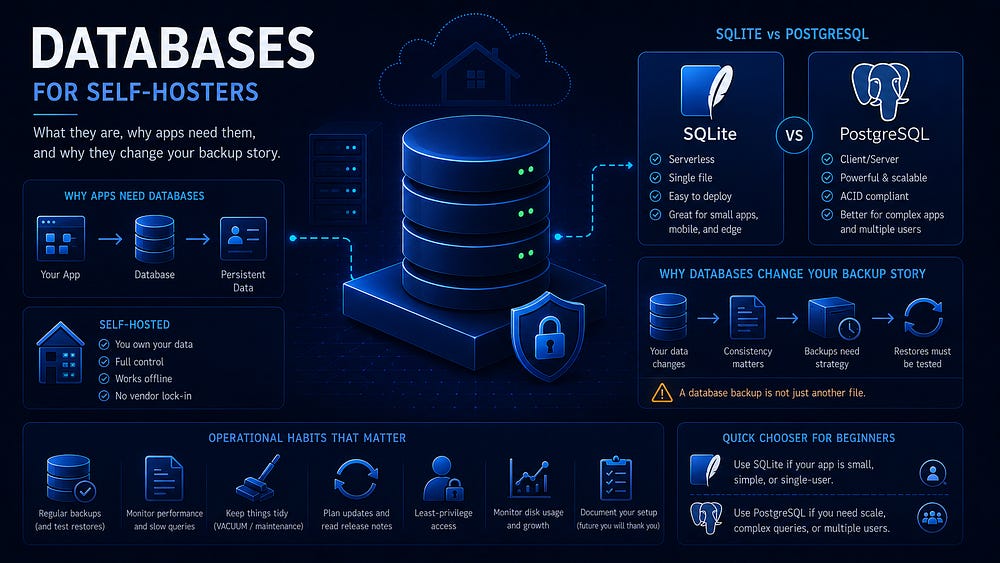
Many self-hosted apps are not just files. They are files, configuration, and database state. That changes how you upgrade them, back them up, move them, and recover them when something goes wrong.
If you have been self-hosting for any length of time, you have probably seen this pattern: you start a container, point it at a data directory, and assume that directory contains everything worth keeping. Sometimes it does. A static site generator, a media library that stores metadata in JSON, or a simple wiki may genuinely be file-oriented. But many modern apps split their state across two places: visible files on disk and structured data inside a database.
This article is an operational introduction to databases for self-hosters. We are not going deep into relational theory or teaching SQL joins. The useful questions here are more practical: what state does the app create, where does that state live, how do you back it up safely, and why is “I mounted the volume” sometimes not enough.
The cleanest contrast is SQLite vs PostgreSQL.
PostgreSQL’s documentation describes it as using a client/server model. A database server process runs continuously, accepts client connections, manages concurrency, and owns the database’s on-disk layout.
SQLite’s documentation describes it as an embedded SQL database engine. There is no separate database server process. The SQLite library runs inside the application process and reads and writes ordinary database files directly.
That design difference — server process vs embedded library — explains most of the practical differences self-hosters care about: where the data is, how backups work, how multiple containers interact, and what “migrating the database” actually means.
By the end, you should be able to look at a Docker Compose file or an app’s installation docs and answer four questions: does this app have a database, which kind, what do I need to back up, and what mistakes will hurt me later?
What a database is in self-hosting terms
In self-hosting, the most useful definition of a database is not “a collection of tables.” It is the structured state layer an app relies on. The key word is state.
A running app has two broad categories of information.
First, there is code and configuration: container image layers, binaries, templates, environment variables, config files, and whatever you wrote in your Compose file. This is mostly replaceable. You can delete a container and recreate it from the image. If your configuration is captured in Git or in a documented notes file, you can usually rebuild it.
Second, there is state: the data created by the app while it runs. Users, password hashes, API tokens, sessions, posts, comments, UI settings, job queues, metadata, indexes, and internal bookkeeping all fall into this category. This is the part that is painful to recreate. In many apps, it is effectively impossible.
A database stores state in a structured, queryable, and consistent form. Structured means the data has shape: records, fields, relationships, constraints, and types. Queryable means the app can ask useful questions and get answers efficiently. Consistent means related updates can succeed or fail as a unit instead of leaving the system half-updated after a crash.
For self-hosters, a database usually appears in one of two shapes:
A dedicated database service, most often PostgreSQL or MySQL/MariaDB, running as its own container with its own persistent volume. The application container connects to it over a Docker network.
A database file on disk, most often SQLite, used directly by the app. The file usually lives somewhere under the app’s mounted data directory.
There are hybrids. An app might use SQLite for a local cache but PostgreSQL for primary state. Another might support “SQLite for single-user installs, PostgreSQL for production.” The operational question stays the same: where is the state, and what does it take to restore it reliably?
Why apps use a database instead of just files
Some apps do store state as files. A small tool might keep one JSON document per item, a directory of Markdown files with front matter, or a few YAML configuration files. That is a good design when the data model is simple and the access pattern is predictable.
As apps become interactive, multi-user, and concurrent, file-based state becomes harder to manage correctly.
The first pressure is concurrency. If two requests hit an app at the same time and both need to update state, the app needs safe locking. File locking across processes and containers is easy to misunderstand. A database exists partly so every app developer does not have to rebuild concurrency control from scratch.
The second pressure is atomic updates. Many operations are logically all-or-nothing. Creating a user might require a user record, default settings, a welcome notification, and an entry in a search index. If the system crashes halfway through, you do not want a half-created account. Databases provide transactions so a bundle of related changes can succeed or fail as one unit.
The third pressure is indexing and querying. Once you have more than a few thousand items, scanning a directory and parsing every JSON file becomes a poor fit. Even if it is fast enough today, it tends to break down when you add search, filtering, sorting, permissions, and relationships between records. Databases build indexes so queries such as “show me the last 50 items from users I follow tagged linux created in the last week” do not require reading the entire dataset.
The fourth pressure is integrity. Apps need rules such as “usernames are unique,” “a comment belongs to an existing post,” or “a session references an existing user.” You can enforce those rules in application code, but the storage layer is often the safer place to hold them over years of feature growth.
Finally, databases come with mature operational tooling: migrations, dumps, restores, replication options, monitoring hooks, and failure modes that are at least well documented. For developers, choosing PostgreSQL is often choosing a known foundation rather than inventing a private persistence format.
The self-hoster inherits both sides of that choice. The database gives the app stronger guarantees than “write a file,” but it also becomes part of the system you operate.
App and database state: the mental model
Below is the model to keep in your head when you read self-hosting docs.
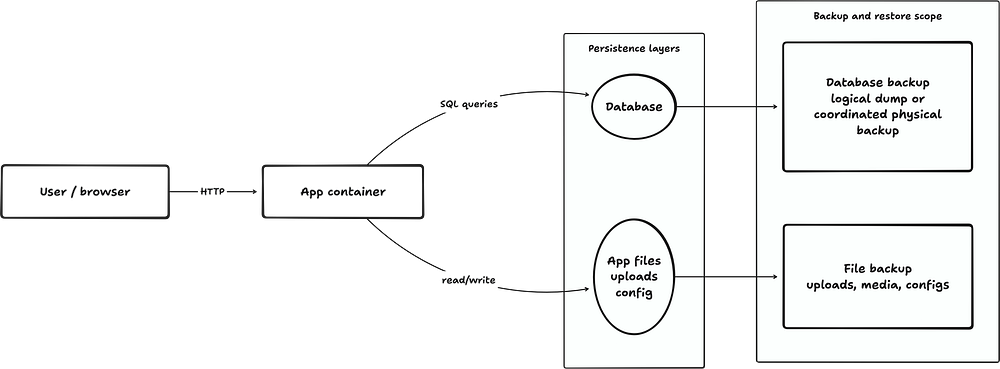
The important point is that persistent app data often splits into at least two layers: database state and file state. Backups need to cover both. Restores need to put both back into a compatible combination.
SQLite vs PostgreSQL in plain English
Start with the simplest explanation that does not lie.
SQLite is a database engine that lives inside the application process. It is a library the app uses directly. When the app wants to run SQL, it calls SQLite functions. The SQLite library reads and writes the database file on disk. There is no database service to start, no TCP port to expose, and no background daemon that owns the data.
PostgreSQL is a database system that runs as a separate service. You start a PostgreSQL server process, often by running a container. Your application connects to it as a client over a socket or network connection. PostgreSQL handles multiple connections, access control, concurrency, transactions, and the database’s on-disk format.
That difference turns into operational consequences.
With SQLite, the app and the database are tightly coupled. If the app is down, the database is not being served by anything else. If you copy the app’s data directory and it contains the SQLite database in a consistent state, you probably copied the database. If you run two app containers against the same SQLite file, especially over a network filesystem, you are taking on locking and consistency risks that many beginner deployments should avoid.
With PostgreSQL, the app and the database are separate components. The database can keep running while you restart the app. Multiple app instances can connect to the same database safely. The database can live on a different host. You can back it up with database-native tools. You also have another service to patch, monitor, upgrade, and restore.
Neither model is universally better. SQLite is excellent for a huge class of single-node apps: small, reliable, simple, and easy to ship. PostgreSQL is excellent when you need stronger multi-user concurrency, larger operational headroom, and mature server-side tooling.
For self-hosters, the useful question is not “which database is more powerful?” It is “which operational shape does this app have, and can I run that shape safely?”
SQLite vs PostgreSQL comparison
A useful shorthand: SQLite feels like an app with a serious state file. PostgreSQL feels like an infrastructure service your app depends on.
What changes operationally when a database is involved
This is where beginners get hurt. Databases are not dangerous by themselves. The problem is carrying over assumptions from file-only apps.
