
HTTPS for self-hosters: certificates, ACME, and why renewals should be boring
What certificates do, how Let's Encrypt validation works, and when HTTP-01 vs DNS-01 matters

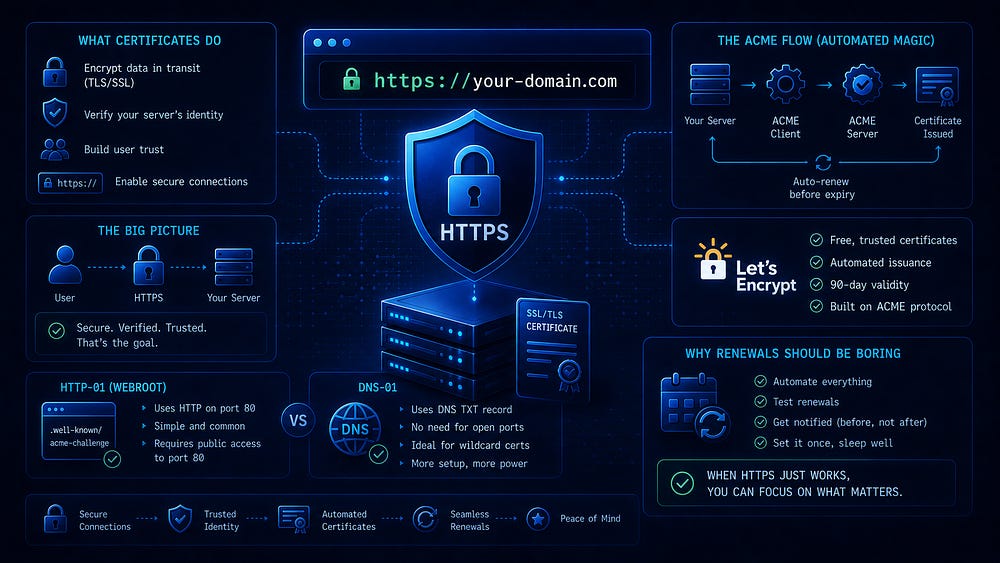
HTTPS feels magical until the first renewal fails. After that, it becomes easier to see it for what it is: one more small infrastructure lifecycle that needs ownership.
If you self-host long enough, you eventually meet the same failure pattern. A site that has worked quietly for weeks starts throwing warnings, monitoring begins to complain, and the visible symptom is only “certificate expired” or “TLS handshake failed.” The cause is rarely mysterious. A scheduled renewal stopped working, a port stopped being reachable, a DNS credential changed, or a proxy kept serving the old certificate.
This article explains what HTTPS actually gives you, what a certificate is, what ACME automates, and how Let’s Encrypt proves that you control a domain. Then we’ll look at the two challenge types most self-hosters care about, HTTP-01 and DNS-01, and choose between them based on topology rather than habit. Finally, we’ll treat renewals as they should be treated: an automated job that is observable, repeatable, and easy to recover.
You do not need to become a cryptographer to operate HTTPS well. You do need to know where the trust boundaries are, where state lives, and which parts must keep working after the first successful setup.
What HTTPS actually gives you
People often describe HTTPS as “encryption,” but that undersells it. HTTPS is HTTP over TLS. HTTP is the application protocol: requests, responses, URLs, headers, cookies, and bodies. TLS (Transport Layer Security) is the secure transport underneath it.
TLS gives you three core properties.
First, it gives you confidentiality. Without TLS, anyone who can observe the network path between a client and your server can read the traffic: Wi-Fi operators, ISPs, corporate proxies, compromised routers, or someone on the same LAN. With TLS, the content is encrypted in transit. Observers can still see metadata such as IP addresses, port numbers, traffic volume, and often the domain name through DNS and SNI, depending on the client and network setup.
Second, it gives you integrity. Encryption alone does not prove that data arrived unchanged. TLS includes message authentication, so active tampering becomes detectable. This matters for everything from protecting cookies to preventing an intermediary from rewriting JavaScript.
Third, it gives you authentication, with a precise scope. Normal browser HTTPS authenticates the server to the client. The client usually does not present an identity at the TLS layer unless you deliberately use mutual TLS (mTLS). What the client gets is cryptographic evidence that the other end is authorized to represent example.com.
That third property is where certificates enter the picture.
What HTTPS does not give you
TLS does not make an application secure by itself. It will not fix broken authentication logic, SQL injection, SSRF, a leaky admin panel, or a misconfigured object store. TLS can protect credentials in transit; it cannot stop an application from accepting password=1234.
TLS also does not hide the fact that a connection exists, who is connecting to whom, or how much data is moving. It protects the content, not the existence of the conversation.
Nor does TLS automatically settle trust inside your own stack. If you put Nginx or Caddy in front of an internal service and the backend hop uses plain HTTP, you are trusting that internal path. That can be a valid operational decision, especially on a single host or a private network, but it should be a conscious one.
The practical promise of HTTPS is narrower and more useful than “security”: clients can talk privately to the intended server and detect tampering. Certificates are how “the intended server” is established.
What a certificate is
A TLS certificate is a signed data structure that binds a public key to one or more names, usually DNS names. For a self-hoster, it is best understood as an identity document for a server endpoint.
When a browser connects to
https://photos.example.com
, the server presents a certificate during the TLS handshake. That certificate says, in effect:
Here is a public key.
This key is valid for these names, such as
photos.example.com.This certificate is valid during this date range.
A trusted Certificate Authority (CA) signed this statement.
The browser checks whether it trusts the issuing CA, either directly or through an intermediate certificate. It also checks that the certificate matches the requested domain name and that the certificate is currently valid. If those checks pass, the browser can continue the TLS handshake.
Public keys, private keys, and the one thing you must not lose
TLS relies on asymmetric cryptography. You generate a keypair:
The private key stays under your control.
The public key can be shared.
The certificate contains, or is associated with, the public key. During the handshake, the server proves it has the corresponding private key.
The private key is the sensitive part. If someone steals it, they can impersonate your server for the names covered by that certificate until the certificate expires, unless the certificate is revoked and clients enforce that revocation. Revocation behavior on the public web is complicated enough that it should not be your main safety plan.
Treat certificate private keys like production secrets. Store them with restrictive permissions, limit where they are copied, and avoid scattering wildcard keys across machines just because it is convenient.
Names: CN, SANs, and why wildcard certificates exist
Older certificates used the Common Name (CN) field as the primary name. Modern certificates use Subject Alternative Names (SANs) to list the DNS names a certificate covers. A single certificate can cover multiple names such as example.com, www.example.com, and api.example.com.
A wildcard certificate uses a name like *.example.com to cover first-level subdomains. It covers photos.example.com and grafana.example.com, but not a.b.example.com.
Wildcards are useful when you operate many subdomains or dynamic subdomains. They also change the risk profile. One private key can cover many services, and Let’s Encrypt requires DNS-01 validation for wildcard issuance.
The trust chain
Browsers do not ship with every site certificate. They ship with a set of trusted root CAs. Your server certificate is usually issued by an intermediate CA, and that intermediate chains back to a trusted root.
So the client validates a chain:
Your leaf/server certificate
One or more intermediate certificates
A root certificate already trusted by the client
If the server does not send the correct intermediate chain, some clients will fail even when the leaf certificate is otherwise valid. This is why many tools distinguish between the leaf certificate and the “full chain” file used by the web server or reverse proxy.
Expiration is a feature
Certificates expire because the public web’s trust model needs rotation. Shorter lifetimes reduce the useful life of a compromised key and force certificate operations to be automated instead of treated as a yearly calendar reminder.
Let’s Encrypt’s default certificates are still 90-day certificates at the time of writing, with a recommendation to renew them every 60 days. It has also announced a staged move toward shorter lifetimes through 2028, including 64-day and eventually 45-day default certificates. The operational lesson does not change: renewal must be automatic, reliable, and visible.
If that sounds stressful, the problem is not the certificate lifetime. The problem is treating renewal as a manual ritual. ACME exists to remove that ritual.
What ACME is
ACME stands for Automatic Certificate Management Environment. It is the protocol that automates certificate issuance and renewal.
Before ACME, getting a certificate often meant manual validation, emails, yearly reminders, and human handoffs. ACME turned issuance into an API workflow. Let’s Encrypt is the best-known ACME CA, but ACME is a standard protocol, and other CAs can implement it too.
In practice, you rarely speak ACME directly. You run an ACME client such as Certbot, acme.sh, lego, Caddy’s built-in ACME support, Traefik, or a Kubernetes controller like cert-manager. The client talks to the CA, manages ACME account state, prepares certificate keys, satisfies challenges, installs certificates, and renews them.
There are two different keys worth keeping separate in your mental model:
The ACME account key, which identifies your ACME account to the CA.
The certificate private key, which belongs to the certificate your server will present.
A simplified ACME lifecycle looks like this:
You configure the ACME client with the domain name or names you want and the challenge method it should use.
The client creates or reuses a certificate private key and generates a Certificate Signing Request (CSR).
The CA asks you to prove control of the requested name.
The client satisfies a challenge, usually HTTP-01 or DNS-01.
The CA issues the certificate.
The client installs the certificate and renews it before expiry.
The key step is proving control. Let’s Encrypt is not verifying that you are a particular person or company. It is verifying that you control the domain in a way that authorizes you to serve traffic for it.
Let’s Encrypt’s challenge-type documentation is the canonical reference here: HTTP-01 and DNS-01 are different ways to prove control of a domain.
