
Service dependencies explained: app, database, cache, proxy, queue—and what depends on what
A practical guide to multi-service thinking, why modern apps are rarely “just one thing,” and how dependency order affects reliability

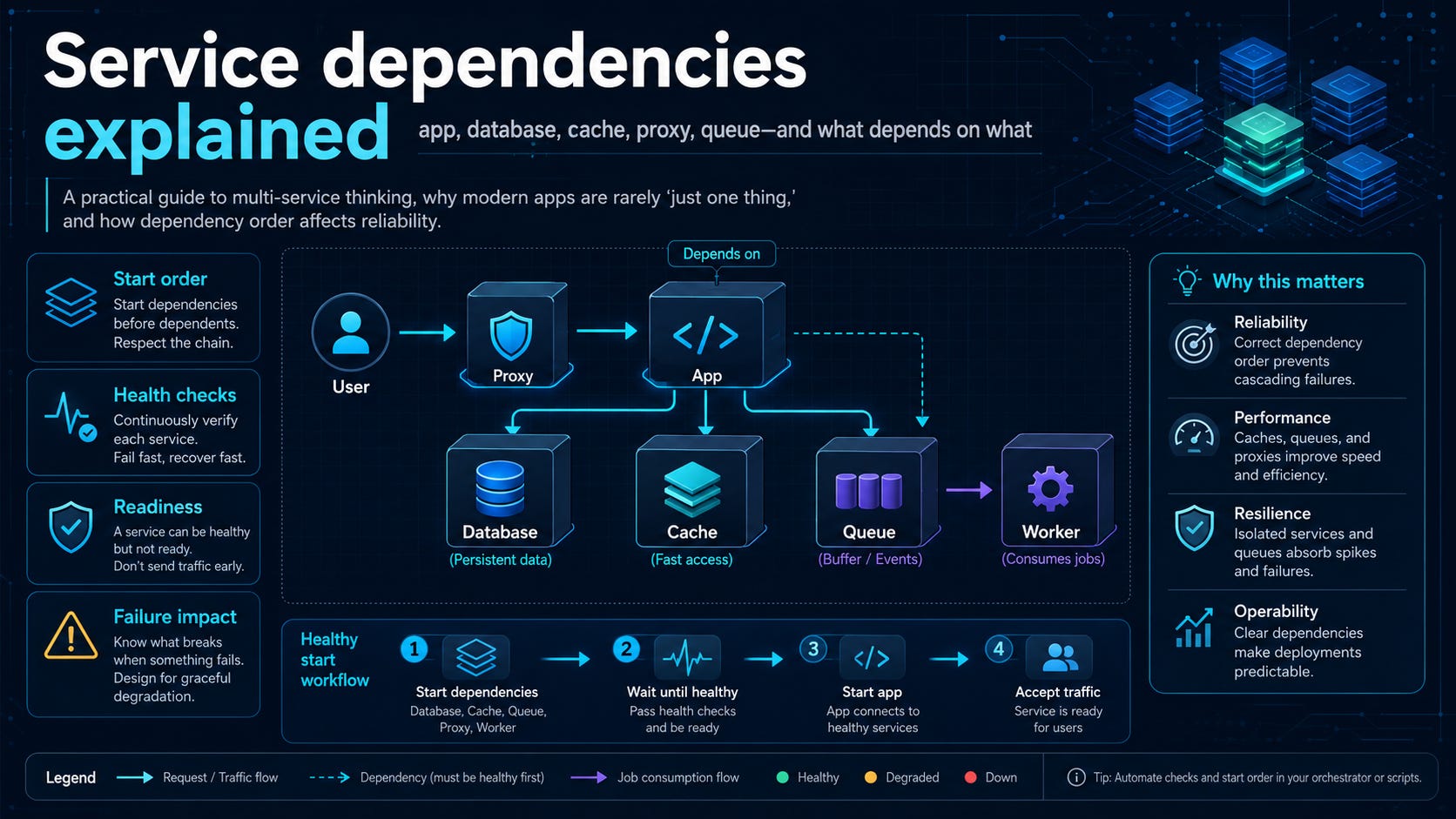
A lot of self-hosted apps look simple from the outside and turn into a small ecosystem once you open the Compose file.
That surprises people the first few times they self-host something more serious than a static site. You install “an app,” but the stack may include an application container, a database, Redis, a background worker, a reverse proxy, and sometimes a message queue. If one of those pieces is missing, slow, misconfigured, or unhealthy, the whole system may look broken even when the main application container is technically running.
Service dependencies matter for that reason. They are not only a Docker Compose feature. They are a way to read modern application stacks. Compose gives you tools such as depends_on and health-aware startup conditions. Docker’s Compose startup-order documentation is explicit that Compose starts and stops containers in dependency order, and that condition: service_healthy can delay a dependent service until a dependency’s health check passes. That is useful, but it is only the first layer. Compose can sequence startup; it cannot make a complicated architecture simple, and it cannot rescue a stack whose parts are present but not actually ready to serve traffic.
To self-host comfortably, you need a better mental model than “run the app container.” Read the stack as a dependency graph: this service needs that one, this layer talks to that layer, and some failures are direct while others are indirect. Once you start reading stacks that way, deployment and troubleshooting become less mysterious.
Why “single app” is often misleading
In self-hosting, “app” usually means “the thing I care about,” not “the only process involved.” A modern web application might render pages, store data, cache sessions, offload slow jobs to a worker, and sit behind a reverse proxy that handles TLS and routing. From a user’s perspective, that still feels like one app. Operationally, it is a small distributed system.
This is one reason Compose files are useful teaching material. They force architecture into the open. A stack that looked like one unit in a README suddenly shows named services, environment variables, volumes, networks, ports, health checks, and dependency rules. Beginners often read that as clutter. It is better understood as a map.
That map tells you two things immediately: what the application is made of, and what must be working before anything higher in the stack can function. If the app needs PostgreSQL and Redis, the worker needs Redis, and the proxy forwards requests to the app, then “the app is down” can mean several different things.
Many failures are dependency failures wearing application-shaped masks.
The common service roles in self-hosting
Not every stack includes every role, but the same patterns repeat often enough that it helps to learn them as a set.
These roles matter because they fail differently.
A database is usually a hard dependency. If the app cannot connect to it, the app often cannot start or becomes effectively useless. A cache may be a soft dependency in one system and a hard dependency in another. If Redis is used only for optional caching, the app may limp along without it. If Redis stores sessions, distributed locks, rate-limit state, or broker data for a job system, losing it can break login, background work, or coordination.
A worker is easy to miss because users may not notice its failure immediately. The site loads, forms submit, and everything looks healthy until emails stop sending, thumbnails stop generating, or webhook processing stalls. The visible interface can suggest health while asynchronous work quietly piles up.
A proxy can be deceptive in the opposite direction. If the proxy is down or misrouted, the app may be fine internally while every external request fails. Testing only through the browser makes the app appear dead. Testing the upstream service on the internal network may show that the application itself is working.
A queue sits in a similarly subtle place. When it fails, user-facing symptoms may be delayed or partial. The system accepts work but cannot drain it, or the worker starts but has nothing usable to consume.
A multi-service stack diagram
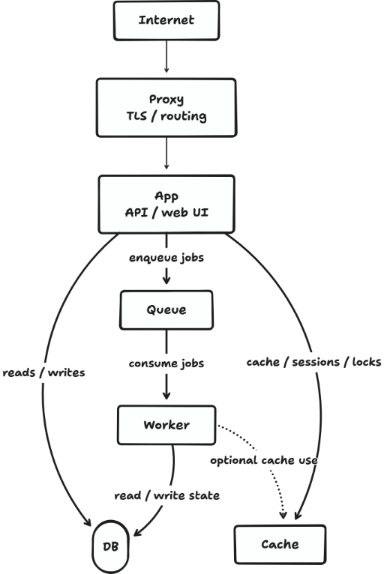
This is not a universal architecture, but it is common enough to be a useful default picture. The important point is that these are not just neighboring containers. They represent different operational responsibilities and different failure surfaces.
I write for people who want clearer technical decisions, not just longer tool lists. Subscribe for more self-hosting comparisons, trade-offs, and practical recommendations.
