
What a container image actually is: OCI, registries, tags, and what Docker is really downloading
The beginner guide to image formats, registries, tags, and why "latest" is not a deployment strategy

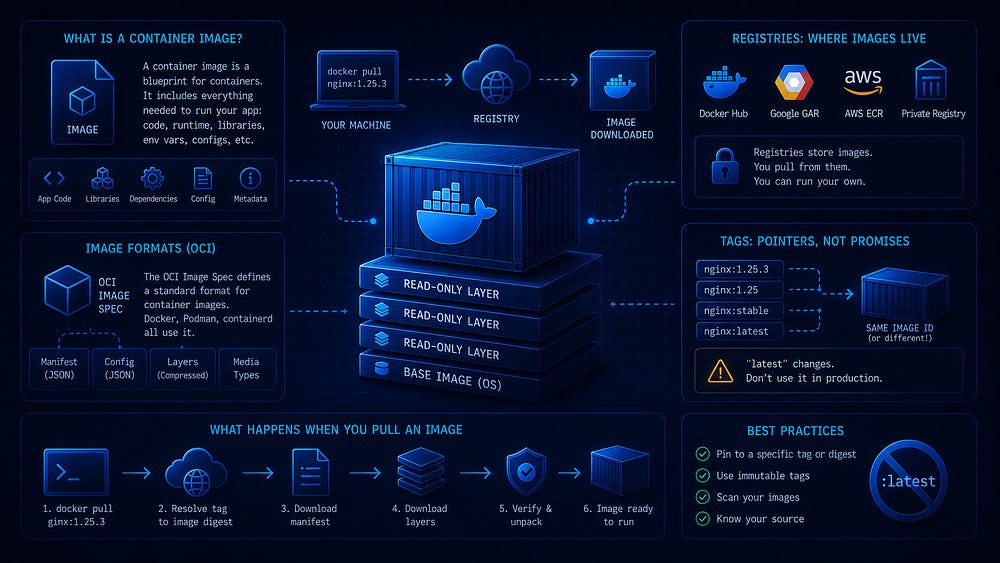
When you type docker run nginx, it is easy to treat the result as magic. An image appears, a container starts, and a web server begins accepting traffic. Many beginner tutorials encourage exactly that level of understanding: run the command, see the result, move on.
That is fine for a first encounter. It is not enough once containers run anything you care about. A container image is not simply “the app.” It is a packaged artifact inside a standards-based ecosystem of formats, runtimes, distribution APIs, and naming conventions. When you need to debug a failed deployment, pin a dependency, audit what is running, or move between Docker, Podman, containerd, and other tools, the details behind that artifact start to matter.
This article is about those details. We will look at what an image contains, what the Open Container Initiative is and why it exists, how registries work, what tags and digests really mean, and what Docker does when it pulls an image. None of this requires deep systems programming knowledge. It does require dropping the idea that images are opaque blobs you never need to inspect.
Why images deserve their own article
Most Docker introductions treat images as a prerequisite to containers: you need one to start the other, and that is about it. The Dockerfile gets attention. Runtime behavior gets attention. The image itself is often presented as a noun you invoke but never examine.
That gap causes practical problems.
Images are the unit of distribution in container-based systems. When a CI pipeline produces a deployable artifact, that artifact is usually an image. When a deployment system rolls out new code, it pulls an image. When a security scanner checks what you are running, it inspects an image. If you do not understand what an image is, you do not fully understand what you are shipping.
The ecosystem is also no longer Docker-only. Podman, containerd, CRI-O, Buildah, Skopeo, Kubernetes, and many registry products all produce, move, inspect, or consume container images. They interoperate because images follow shared specifications. Understanding that standard at a high level is what lets you move between tools without treating each one as a separate universe.
Many operational mistakes also trace back to image misunderstandings: treating latest as a version, confusing tags with immutable identifiers, pulling images from implicit registries, or deploying artifacts without knowing which layers and dependencies they contain. These are not exotic failure modes. They show up in ordinary systems.
So images deserve their own article. If the previous piece in this series introduced Docker and the basic container workflow, this one looks at the artifact at the center of that workflow.
What OCI is and why it matters
OCI stands for the Open Container Initiative. It is an open governance structure, hosted under the Linux Foundation, that maintains industry standards around container formats and runtimes. It was established in 2015, when the container ecosystem needed shared specifications rather than competing vendor-specific formats.
The practical effect is simple: when different tools claim to work with container images, they can mean the same kind of artifact. An image built with Docker can be run with Podman. An image pushed to an OCI-compliant registry can be pulled by another OCI-aware client. A low-level runtime such as runc can receive an unpacked runtime bundle and start a container according to a shared runtime contract.
OCI maintains three core specifications:
The Image Specification defines the structure of a container image: its metadata, manifests, configuration objects, layers, and content-addressed blobs.
The Runtime Specification defines how a runtime creates and starts a container from an unpacked filesystem bundle and configuration. This is the layer implemented by tools such as runc.
The Distribution Specification defines the API used to push and pull images and related artifacts from registries.
You do not need to read these specifications before using containers. But you should know they exist, because they explain why the ecosystem works as a coherent toolchain rather than a set of incompatible products. When someone says “OCI image,” they mean an image that follows the OCI Image Specification. When a registry advertises OCI support, it is referring to the distribution behavior around those artifacts.
For the rest of this article, “container image” means an OCI-style image unless noted otherwise. That covers the normal case in modern container work.
From image to running container: the big picture
Before we look at internals, it helps to see the whole flow from build to runtime:

The image is built and pushed to a registry. A target host pulls the manifest or image index, downloads only the blobs it is missing, stores them locally, and then hands the unpacked filesystem and configuration to the container stack that starts the process. Docker hides much of this from you, but the steps are concrete: resolve a name, fetch metadata, download content-addressed blobs, verify them, assemble the filesystem, then run the configured process.
What an image is made of
A container image is a filesystem package plus metadata. It is not a virtual machine disk, an installer, or a running environment by itself. It contains the files and configuration needed to start a specific program: application code, libraries, system files the program expects, and metadata describing how the program should run.
An image has three essential parts: layers, a configuration object, and a manifest.
